from pathlib import Path

from easyaligner.text import load_tokenizer
from huggingface_hub import snapshot_download

from easytranscriber.pipelines import pipeline
from easytranscriber.text.normalization import text_normalizer

snapshot_download(
    "Lauler/easytranscriber_tutorials",
    repo_type="dataset",
    local_dir="data/tutorials",
    allow_patterns="tale-of-two-cities_short-en/*",  # Wildcard pattern
    # max_workers=4,
)


tokenizer = load_tokenizer("english") # For sentence tokenization in forced alignment
audio_files = [file.name for file in Path("data/tutorials/tale-of-two-cities_short-en").glob("*")]
pipeline(
    vad_model="pyannote",
    emissions_model="facebook/wav2vec2-base-960h",
    transcription_model="distil-whisper/distil-large-v3.5",
    audio_paths=audio_files,
    audio_dir="data/tutorials/tale-of-two-cities_short-en",
    backend="ct2", # easytranscriber handles conversion between ct2 and hf formats.
    language="en",
    tokenizer=tokenizer,
    text_normalizer_fn=text_normalizer,
    cache_dir="models",
)Overview
easytranscriber is an automatic speech recognition (ASR) library that offers similar functionality to WhisperX – transcription with precise word-level timestamps. While the transcription step itself is well-optimized in most ASR libraries, the surrounding pipeline components (data loading, emission extraction, forced alignment) are often bottlenecks. easytranscriber addresses these inefficiencies by implementing:
- GPU-accelerated forced alignment using Pytorch’s forced alignment API 1.
- Parallel loading and pre-fetching of audio files, enabling efficient, non-blocking data loading and batching.
- Batched inference support for wav2vec2 models (emission extraction).
- Support for independent, parallel processing of emissions (they are written to disk).
1 There’s a tutorial in Pytorch’s official documentation. See also Pratap et al., 2024
Additionally, easytranscriber supports flexible regex-based normalization of transcribed text as a means of improving forced alignment quality. The normalizations are reversible, meaning that the original text can be recovered after forced alignment. easytranscriber also supports using Hugging Face transformers as the backend for inference.
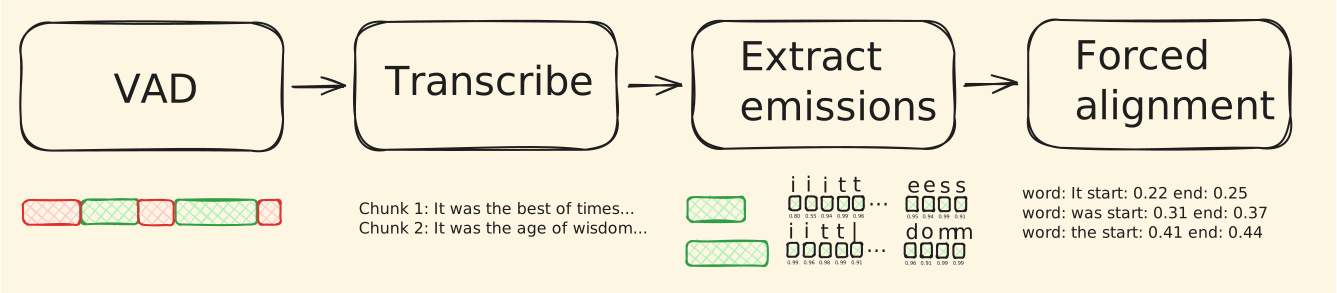
Together, these optimizations result in speedups of 35% to 102% compared to WhisperX2, depending on the hardware configuration used.
2 See the benchmarks page of the documentation.
Installation
With GPU support
pip install easytranscriber --extra-index-url https://download.pytorch.org/whl/cu128
Tip
Remove --extra-index-url if you want a CPU-only installation.
Using uv
When installing with uv, it will select the appropriate PyTorch version automatically (CPU for macOS, CUDA for Linux/Windows/ARM):
uv pip install easytranscriberUsage
For our quickstart guide, we will be transcribing a short clip of the first book and chapter of “A Tale of Two Cities” from LibriVox 3.
3 The original recording can be found here
You can specify any repo with a Whisper model on Hugging Face. easytranscriber will handle the download and conversion to ct24.
4 Ctranslate2 provides C++ optimized inference for Whisper
Tip
A list of suitable emission models for different languages can be found in the WhisperX library.
Hugging Face transformers is also supported as a backend for transcription with backend="hf".
Cohere Transcribe is also supported as a backend with backend="cohere" (requires transformers>=5.4.0 and the arg language to be explicitly specified).
Note
The default VAD model is from pyannote. Their models are gated. To use them, you need to create a Hugging Face access token and accept terms and conditions. Then, either i) save the access token at ~/.cache/huggingface/token or ii) install and use the Hugging Face CLI and run hf auth login. See the Hugging Face Hub quick start guide for more details.
Alternatively, you can switch to silero VAD (CPU-only, slightly slower). Silero can be used without authentication, and performs well. See the vad_model parameter in the docs.
Output
By default, easytranscriber outputs a JSON file for each stage of the pipeline (VAD, emissions, transcription, forced alignment). The final aligned output can be found in output/alignments. The directory structure will look as follows:
output
├── vad                  ← SpeechSegments with AudioChunks
├── transcriptions       ← + transcribed text per chunk
├── emissions            ← + emission file paths (.npy)
└── alignments           ← + AlignmentSegments with word timestamps
Demo
Let’s preview the results as an interactive demo. The text transcript below the audio player will automatically be highlighted in sync with the words spoken in the audio.
Sample audio
A Tale of Two Cities — Chapter 1 (LibriVox)
Tip
You can click anywhere in the text to jump to that point (sentence) in the audio. The text is also highlighted when you drag the audio slider!
Tip
To browse and search your own transcriptions with the same synchronized playback, see easysearch.
Reading the output
Let’s read the final aligned output and print out one of the aligned segments. We can either read it using Python’s build-in json library, or use a convenience function provided in easyaligner that reads in the file as an AudioMetadata object.
from easyaligner.data.utils import read_json
from pprint import pprint

results = read_json("output/alignments/taleoftwocities_01_dickens_64kb_trimmed.json")
# Print the 3rd aligned segment of the first speech
pprint(results.speeches[0].alignments[2].to_dict())
{'duration': 2.02164,
'end': 8.57463,
'id': '0-0-2',
'score': 0.99115,
'start': 6.55299,
'text': 'It was the best of times. ',
'words': [WordSegment(text='It ', start=6.55299, end=6.59302, score=0.99927),
WordSegment(text='was ', start=6.67308, end=6.77316, score=0.99967),
WordSegment(text='the ', start=6.85323, end=6.95331, score=0.9834),
WordSegment(text='best ', start=7.27357, end=7.59383, score=0.9998),
WordSegment(text='of ', start=7.73395, end=7.77398, score=0.99927),
WordSegment(text='times. ', start=7.89408, end=8.57463, score=0.96552)]}Schema
See the reference page of the documentation for a detailed overview of the data models used in easytranscriber. Below is a simplified schema of the final output after forced alignment of our example audio file.
AudioMetadata
├── audio_path       "taleoftwocities_01_dickens_64kb_trimmed.mp3"
├── sample_rate      16000
├── duration         428.93
├── metadata         null
└── speeches[]
    └── SpeechSegment
        ├── speech_id       0
        ├── start           1.769
        ├── end             423.948
        ├── text            null
        ├── text_spans      null
        ├── duration        422.179
        ├── audio_frames    null
        ├── probs_path      "taleoftwocities_01_dickens_64kb_trimmed/0.npy"
        ├── metadata        null
        │
        ├── chunks[]                          ← VAD segments, transcribed by ASR
        │   ├── [0] AudioChunk
        │   │   ├── start         1.769
        │   │   ├── end           28.162
        │   │   ├── text          "Book 1. Chapter 1, The Period. It was the
        │   │   │                  best of times. It was the worst of times..."
        │   │   ├── duration      26.393
        │   │   ├── audio_frames  422280
        │   │   └── num_logits    1319
        │   ├── [1] AudioChunk
        │   │   ├── start         29.039
        │   │   ├── end           57.085
        │   │   └── text          "It was the winter of despair..."
        │   └── ... (19 chunks total)
        │
        └── alignments[]                      ← sentence-level, with word timestamps
            ├── [0] AlignmentSegment
            │   ├── start         1.769
            │   ├── end           2.169
            │   ├── text          "Book 1. "
            │   ├── duration      0.400
            │   ├── score         0.482
            │   └── words[]
            │       ├── { text: "Book ",  start: 1.769, end: 1.909, score: 0.964 }
            │       └── { text: "1. ",    start: 2.149, end: 2.169, score: 0.0   }
            ├── [1] AlignmentSegment
            │   ├── start         3.671
            │   ├── end           5.112
            │   ├── text          "Chapter 1, The Period. "
            │   ├── duration      1.441
            │   ├── score         0.737
            │   └── words[]
            │       ├── { text: "Chapter ", start: 3.671, end: 3.991, score: 0.982 }
            │       ├── { text: "1, ",      start: 4.111, end: 4.131, score: 0.0   }
            │       ├── { text: "The ",     start: 4.471, end: 4.551, score: 0.972 }
            │       └── { text: "Period. ", start: 4.651, end: 5.112, score: 0.992 }
            ├── [2] AlignmentSegment
            │   ├── text          "It was the best of times. "
            │   └── words[]
            │       ├── { text: "It ",     start: 6.553, end: 6.593, score: 0.999 }
            │       ├── { text: "was ",    start: 6.673, end: 6.773, score: 1.000 }
            │       ├── { text: "the ",    start: 6.853, end: ...                 }
            │       └── ...
            └── ...