import re
import requests

url = "https://www.gutenberg.org/cache/epub/98/pg98.txt"
full_text = requests.get(url).text

# Extract Chapter II text (between "CHAPTER II. The Mail" and "CHAPTER III.")
match = re.search(
    r"(?<=CHAPTER II\.\r\nThe Mail\r\n)[\s\S]+?(?=CHAPTER III\.)",
    full_text,
)
text = match.group().strip()Tutorial 2: Known audio region
This tutorial covers the case where you i) have a text transcription that covers only part of the spoken content in an audio file, and ii) the start and end timestamps of the corresponding audio segment are known.
For the tutorial, we will use:
- An audio recording spanning the first four chapters of “A Tale of Two Cities”, read by Bob Neufeld (LibriVox).
- The Chapter II text from the corresponding Project Gutenberg ebook, while omitting the text of the other three chapters.
A situation where one might have knowledge of the relevant audio region in advance can occur when working with metadata enriched recordings. Examples of this include parliamentary debates, where detailed minutes and agenda items are often published; or audiobooks, where a table of contents may provide timestamps for each chapter.
NoteScenario
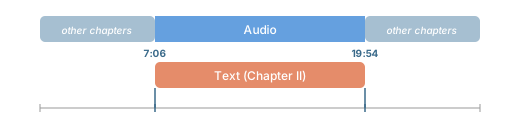
A text representing only part of the spoken content in the audio. The timestamps of the corresponding audio segment are known in advance.
Download text and audio
We start by extracting the Chapter II text from Project Gutenberg.
Next, we download the multi-chapter audio file.
from pathlib import Path
from huggingface_hub import snapshot_download

filepath_pattern = "tale-of-two-cities_long-en/taleoftwocities_01_dickens_128kb.mp3"

snapshot_download(
    "Lauler/easytranscriber_tutorials",
    repo_type="dataset",
    local_dir="data/tutorials",
    allow_patterns=filepath_pattern,
)

filepath = Path("data/tutorials") / filepath_pattern
audio_dir = filepath.parent
audio_files = [filepath.name]
Here’s the audio we’ll be working with. Chapter II begins at 7:06 and ends at 19:54.
Sample audio
A Tale of Two Cities — Chapters 1–4 (LibriVox)
Align text and audio
Since we already know that Chapter II begins at 7:06 (426 seconds) and ends at 19:54 (1194 seconds) in this recording, we can pass those timestamps directly to SpeechSegment.
import re
from transformers import AutoModelForCTC, Wav2Vec2Processor

from easyaligner.data.datamodel import SpeechSegment
from easyaligner.pipelines import pipeline
from easyaligner.text import load_tokenizer, text_normalizer, paragraph_tokenizer
from easyaligner.vad.pyannote import load_vad_model

# Chapter II begins at 7:06 (426 s) and ends at 19:54 (1194 s)
speeches = [
    [
        SpeechSegment(
            speech_id="chapter-ii",
            text=text,
            text_spans=None, # We pass a paragraph tokenizer to pipeline
            start=426,
            end=1194,
        )
    ]
]

# Load models and run pipeline
model_vad = load_vad_model()
model = AutoModelForCTC.from_pretrained("facebook/wav2vec2-base-960h").to("cuda").half()
processor = Wav2Vec2Processor.from_pretrained("facebook/wav2vec2-base-960h")

pipeline(
    vad_model=model_vad,
    emissions_model=model,
    processor=processor,
    audio_paths=audio_files,
    audio_dir=audio_dir,
    speeches=speeches,
    alignment_strategy="speech",
    text_normalizer_fn=text_normalizer,
    tokenizer=paragraph_tokenizer,
    start_wildcard=True,
    end_wildcard=True,
    blank_id=processor.tokenizer.pad_token_id,
    word_boundary="|",
)
NoteSpeechSegment
Passing start and end to SpeechSegment restricts the forced alignment to that region of the audio. Audio outside the region is ignored.
Tip
A list of suitable emission models for different languages can be found in the WhisperX library.
If your audio and transcript are multilingual, you can try using the Massively Multilingual Speech model from Meta: mms-1b-all.
NoteWildcards
start_wildcard=True and end_wildcard=True allow the aligner to tolerate a small amount of extra speech at the region boundaries. This is useful when your timestamps are approximate rather than exact. See the Pytorch forced alignment tutorial for details on star token wildcards.
Result: Force aligned output
Once alignment is done, we can create an interactive demo to visualize the results. It plays back the audio with synchronized text highlighting. Note how each word in the transcript below is highlighted as it is spoken.
Keep in mind that Chapter II starts at 7:06 and ends at 19:54 in the recording. The text will only be highlighted when the audio slider is between those timestamps.
Sample audio
A Tale of Two Cities — Chapters 1–4 (LibriVox)
Tip
You can click anywhere in the text to jump to that point in the audio. The text is also highlighted when you drag the audio slider!
What if the timestamps are not known?
If the timestamps for your excerpt are not known in advance, easyaligner can discover them automatically using fuzzy text matching against an ASR transcription of the full audio. See Tutorial 3 for that workflow.