import re
import requests

url = "https://www.gutenberg.org/cache/epub/98/pg98.txt"
full_text = requests.get(url).text

# Extract Chapter II text (between "CHAPTER II. The Mail" and "CHAPTER III.")
match = re.search(
    r"(?<=CHAPTER II\.\r\nThe Mail\r\n)[\s\S]+?(?=CHAPTER III\.)",
    full_text,
)
text = match.group().strip()Tutorial 3: Unknown audio region
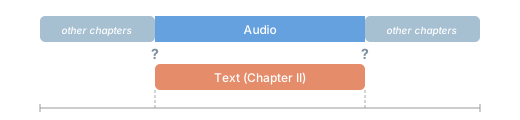
This tutorial covers the case where you have a text transcript that represents only part of an audio file, and you do not know at which timestamps the transcript begins and ends.
Our strategy will be the following:
- Transcribe the full audio automatically using ASR, producing word-level timestamps for everything spoken.
- Locate the ground-truth text within the ASR transcription using fuzzy text matching.
- Align the ground-truth text to the discovered audio region using forced alignment.
For the tutorial, we will use:
- An audio recording spanning the first four chapters of “A Tale of Two Cities”, read by Bob Neufeld (LibriVox).
- The text for Chapter II only, extracted from the Project Gutenberg ebook.
NoteScenario
A text transcript covering only part of the spoken content in the audio. The transcript’s location within the audio is unknown.
Download text and audio
We start by extracting the Chapter II text from Project Gutenberg.
Next, we download the multi-chapter audio file.
from pathlib import Path
from huggingface_hub import snapshot_download

filepath_pattern = "tale-of-two-cities_long-en/taleoftwocities_01_dickens_128kb.mp3"

snapshot_download(
    "Lauler/easytranscriber_tutorials",
    repo_type="dataset",
    local_dir="data/tutorials",
    allow_patterns=filepath_pattern,
)

filepath = Path("data/tutorials") / filepath_pattern
audio_dir = filepath.parent
audio_files = [filepath.name]
Step 1: Transcribe the full audio
Because we do not know where Chapter II begins and ends, we first transcribe the entire audio file. This gives us word-level timestamps for everything spoken — including the chapters we don’t care about.
from easyaligner.text import load_tokenizer
from easytranscriber.pipelines import pipeline as transcription_pipeline
from easytranscriber.text.normalization import text_normalizer as easytranscriber_text_normalizer

tokenizer = load_tokenizer(language="english")

transcription_pipeline(
    vad_model="pyannote",
    emissions_model="facebook/wav2vec2-base-960h",
    transcription_model="distil-whisper/distil-large-v3.5",
    audio_paths=audio_files,
    audio_dir=str(audio_dir),
    backend="ct2",
    language="en",
    tokenizer=tokenizer,
    text_normalizer_fn=easytranscriber_text_normalizer,
    cache_dir="models",
)
The transcription output is written to output/alignments/. We read it back as an AudioMetadata object:
from easyaligner.data.utils import read_json

alignment_json = Path("output/alignments") / filepath.with_suffix(".json").name
audio_meta = read_json(alignment_json)
Step 2: Locate Chapter II with fuzzy matching
With ASR word-level timestamps in hand, we search for Chapter II’s ground-truth text within the ASR transcription. The function fuzzy_match handles this in one call. It concatenates all timestamped words from the ASR output, uses rapidfuzz to find the best matching region, and returns the word indices for the match.
from easyaligner.text import fuzzy_match

match = fuzzy_match(needle=text, haystack=audio_meta.speeches)

if match is None:
    raise RuntimeError(
        "Could not find Chapter II in the transcription. Try lowering the threshold."
    )

print(f"Match score:    {match.score:.1f} / 100")
print(f"Match indices (word-level):  {match.start_index} (start) – {match.end_index} (end)")
print(f"Match timestamps: {match.start:.1f}s – {match.end:.1f}s")
Match score: 92.8 / 100
Match indices (word-level): 1054 (start) – 3081 (end)
Match timestamps: 424.8s – 1193.2sThe returned FuzzyMatch object contains the discovered timestamps (match.start, match.end), as well as the word-level indices.
Tip
To inspect the matched words, pass return_words=True. This can be useful for debugging and sanity checking.
match, words = fuzzy_match(needle=text, haystack=audio_meta.speeches, return_words=True)
# Print the first and last matched words
print(words[match.start_index])
print(words[match.end_index])
Step 3: Align text and audio
With approximate start and end times discovered, we run forced alignment using the ground-truth text and the relevant audio region. This step produces precise word-level timestamps based on the original text, while maintaining its formatting, as in Tutorial 1.
from transformers import AutoModelForCTC, Wav2Vec2Processor

from easyaligner.data.datamodel import SpeechSegment
from easyaligner.pipelines import pipeline
from easyaligner.text import text_normalizer
from easyaligner.vad.pyannote import load_vad_model

span_list = list(tokenizer.span_tokenize(text))

speeches = [
    [
        SpeechSegment(
            speech_id="chapter-ii",
            text=text,
            text_spans=span_list,
            start=match.start,
            end=match.end,
        )
    ]
]

model_vad = load_vad_model()
model = AutoModelForCTC.from_pretrained("facebook/wav2vec2-base-960h").to("cuda").half()
processor = Wav2Vec2Processor.from_pretrained("facebook/wav2vec2-base-960h")

pipeline(
    vad_model=model_vad,
    emissions_model=model,
    processor=processor,
    audio_paths=audio_files,
    audio_dir=audio_dir,
    speeches=speeches,
    alignment_strategy="speech",
    text_normalizer_fn=text_normalizer,
    tokenizer=tokenizer,
    start_wildcard=True,
    end_wildcard=True,
    blank_id=processor.tokenizer.pad_token_id,
    word_boundary="|",
)
Note
start_wildcard=True and end_wildcard=True allow the forced aligner to tolerate a small amount of extra speech at the region boundaries. Useful here because the fuzzy match returns approximate rather than exact timestamps.
The aligned output is written to output/alignments/. The output contains sentence-level segments and word-level timestamps from the original Chapter II text.
Result: Force aligned output
Once alignment is done, we can create an interactive demo to visualize the results. It plays back the audio with synchronized text highlighting. Note how each word in the transcript below is highlighted as it is spoken.
The fuzzy match located Chapter II starting at approximately 7:05 in the recording. The text will only be highlighted when the audio slider is within that region.
Sample audio
A Tale of Two Cities — Chapters 1–4 (LibriVox)
Tip
You can click anywhere in the text to jump to that point in the audio. The text is also highlighted when you drag the audio slider!